
Learn how to optimize YouTube Shorts for SEO with practical tips for keywords, titles, retention, hashtags, analytics, and more organic views.
If your YouTube Shorts are getting views one day and barely getting shown the next, it is easy to assume that SEO simply does not matter for Shorts. That is not really how it works. YouTube Shorts SEO is less about finding a secret keyword formula and more about helping YouTube understand what your video is about while giving viewers a reason to stop scrolling, watch, and stay interested.
A Short can be perfectly optimized with a strong keyword and still perform poorly if the opening is boring. On the other hand, a highly engaging Short can reach a large audience even when the creator did not spend hours researching keywords. The smartest strategy sits between those two extremes: make the topic clear, use relevant language naturally, and then create a video that people actually want to watch.
YouTube itself says that its systems look at how viewers respond when Shorts are recommended, including whether people choose to watch, how long they watch, and the percentage of the Short they watch. Likes and post-watch survey signals can also contribute to understanding whether viewers enjoyed the content.
That gives us an important starting point: SEO can help YouTube understand your Short, but viewer satisfaction is what gives that optimization a chance to turn into reach.
What YouTube Shorts SEO Actually Means?
YouTube Shorts SEO is the process of optimizing your Short so that YouTube can better understand its topic and connect it with people who may be interested in it. That includes the obvious elements such as the title, description, keywords, hashtags, and spoken content, but it also includes the less obvious part: the actual experience viewers have after YouTube shows them your video.
Think about a Short titled “3 Easy Ways to Save Money on Groceries.” The title immediately tells YouTube and viewers what the content is about. If the creator also talks about grocery savings during the video, uses relevant wording in the description, and delivers useful information quickly, there is a strong connection between the search query, the metadata, and the actual content.
That is much stronger than writing something vague such as “You Won’t Believe This!” and hoping the algorithm figures everything out. YouTube Search considers relevance, engagement, and quality, and its documentation specifically explains that title, tags, description, and video content can help determine how well a video matches a search query.
Why SEO Matters for Shorts?
Shorts are primarily consumed through a highly personalized feed, but that does not mean search visibility is irrelevant. YouTube Analytics can show creators how viewers found their Shorts, including traffic from the Shorts Feed, YouTube Search, channel pages, browse features, external sources, and other surfaces.
That matters because a searchable Short can potentially continue attracting viewers after its initial upload period. A trend-based Short might explode quickly and then fade, while an evergreen tutorial such as “How to Change Your iPhone Battery Settings” may remain useful for months.
The best Shorts strategy usually combines both approaches. Use trends when they genuinely fit your audience, but build a library of searchable and evergreen Shorts that can continue answering questions people are actively asking.
How Does YouTube Discover and Rank Shorts?
There is no public formula that says a Short will receive a certain number of views because it has a particular keyword, retention percentage, or number of hashtags. Anyone claiming to know an exact secret formula is going beyond what YouTube publicly confirms.
YouTube explains that its Shorts recommendation systems consider how viewers respond when a Short is shown to them. The system can look at whether viewers choose to watch or ignore the Short, whether they stay, average view duration, average percentage viewed, likes, and other satisfaction-related signals.
This is why YouTube Shorts ranking factors should be thought of as a combination of relevance and viewer response rather than a simple checklist.
Shorts Feed vs. YouTube Search
The Shorts Feed and YouTube Search serve different purposes.
Someone scrolling through the Shorts Feed may not have searched for your topic at all. You have only a moment to convince that person that your video is worth watching. The viewer might see your opening frame, hear your first sentence, and immediately decide whether to continue or swipe.
Search is different. Someone searching “how to clean AirPods” already has a problem or question. A Short that directly answers that query has an opportunity to appear because its topic is relevant to the search.
YouTube Search prioritizes relevance, engagement, and quality, and YouTube says relevance can involve how well the title, tags, description, and video content match the viewer’s search.
So, if you want your Short to be discoverable in both places, optimize for two different moments:
- Search intent: Make the subject obvious.
- Viewer behavior: Make the actual video compelling enough to watch.
The Signals YouTube Uses to Evaluate Shorts
One of the most useful things creators can do is stop obsessing over views alone.
YouTube Studio currently provides Shorts-specific metrics including views, likes, subscribers, shown in feed, and how many viewers chose to view rather than swipe away. It also provides average view duration and average percentage viewed for Shorts.
Imagine two Shorts.
The first receives 10,000 feed impressions, but many viewers immediately swipe away. The second receives only 4,000 initial opportunities but a much larger proportion of viewers choose to watch and stay engaged.
The second video may have a healthier foundation because the content is better at converting an opportunity into an actual viewing experience. That does not mean one metric guarantees distribution, but it does give you useful evidence about what your audience is responding to.
Choose a Searchable Topic Before You Record
A common YouTube Shorts SEO mistake is starting with a video idea that sounds entertaining but has no clear audience problem, question, interest, or topic behind it.
Before recording, ask yourself one simple question:
“What would someone type into YouTube if they wanted this information?”
Suppose you want to create a Short about budgeting. Instead of making a generic video called “My Money Tip,” you could target a specific idea such as “How to Build a $1,000 Emergency Fund.”
The second topic has a clearer search intent. It also gives you a natural structure for the video: introduce the goal, explain the method, provide an example, and finish with a practical takeaway.
This does not mean every Short must target a high-volume keyword. Some of the best Shorts ideas come from highly specific questions, current conversations, audience comments, and problems that people repeatedly encounter.
How to Find Keywords and Search Intent?
Start with YouTube itself. Type a broad topic into the search bar and pay attention to the suggestions YouTube provides. Those suggestions can reveal how people phrase their questions.
You can also use YouTube Analytics research features, Google Trends, keyword research tools, competitor research, and comments on existing videos to identify recurring questions.
The goal isn’t to collect 50 keywords and cram them into one Short. Instead, find one primary topic and a few closely related phrases.
For example:
| Topic | Primary phrase | Related phrases |
|---|---|---|
| Personal finance | how to save money | save money fast, budgeting tips |
| Fitness | beginner home workout | workout at home, no equipment workout |
| Technology | how to free up iPhone storage | clear iPhone storage, iPhone storage full |
| Cooking | easy air fryer chicken | air fryer chicken recipe, crispy chicken |
| YouTube | YouTube Shorts SEO | optimize YouTube Shorts, Shorts SEO tips |
This approach is much more natural than repeating the same phrase over and over.
Optimize Your Shorts Title
Your YouTube Shorts title should quickly communicate what the viewer is going to get.
YouTube recommends putting the most important words near the beginning of titles and distinguishes between searchable titles and titles designed to create curiosity.
For example:
Weak:
“Watch This!”
Better:
“3 YouTube Shorts SEO Tips to Get More Views”
The second title gives the viewer context immediately. It also gives YouTube useful information about the video’s subject.
But don’t turn every title into a robotic keyword string.
Bad:
“How to Optimize YouTube Shorts for SEO | YouTube Shorts SEO | Shorts SEO Tips | YouTube SEO”
Better:
“How to Optimize YouTube Shorts for SEO”
The second version is cleaner, easier to read, and directly matches the topic.
Write Titles for Humans First
A title has one primary job: help the right viewer understand why the video is relevant.
Use your main keyword when it fits naturally, but don’t sacrifice readability. You can also use curiosity when the video genuinely delivers on that curiosity.
For example:
Search-focused:
“How to Clean Your AirPods Without Damaging Them”
Curiosity-focused:
“You’re Probably Cleaning Your AirPods Wrong”
Both can work. The important thing is that the actual Short fulfills the promise.

Write an SEO-Friendly Shorts Description
Descriptions are often neglected because Shorts are consumed quickly. That doesn’t make the description useless.
YouTube says descriptions help explain what a video is about to both viewers and its systems, and recommends using the first few lines to describe the video. YouTube also recommends making descriptions unique and identifying one or two main words that describe the video prominently in the title and description.
For a Short about YouTube keyword research, a natural description could be:
Learn how to find better YouTube keywords for Shorts using search intent, related phrases, and YouTube Analytics. These simple YouTube Shorts SEO tips can help make your videos easier to understand and discover.
Notice what isn’t there: 30 repeated keywords.
The description communicates the topic once or twice and gives viewers useful context.
Use Hashtags and Tags the Right Way
Hashtags can help connect videos around topics, but they are not a substitute for good content.
YouTube allows hashtags in titles and descriptions, and hashtag results can show videos and playlists that use those hashtags. YouTube may also display up to three hashtags from a video’s description near its title.
For a Short about home workouts, something like this is reasonable:
#HomeWorkout #WorkoutTips #Fitness
You don’t need to add every vaguely related hashtag you can think of.
What About YouTube Tags?
This is an area where many creators spend far too much time.
YouTube’s own documentation says that tags play a minimal role in discovery in most cases. They can be useful for common misspellings, but the title, thumbnail, and description are more important metadata elements.
So if you are deciding between spending 20 minutes creating a huge list of tags or spending that time improving the first five seconds of the Short, the opening deserves much more attention.
Optimize the Video Itself With Spoken Keywords and Captions
One of the biggest mistakes in SEO for YouTube Shorts is treating SEO as something that happens only in the upload screen.
The video itself should clearly communicate its topic.
If your title says “How to Lower Your Car Insurance Bill”, but the first 15 seconds are unrelated storytelling, the viewer has to wait too long for the promised value.
Instead, you could begin:
“If your car insurance bill keeps going up, here are three things you should check before your next renewal.”
Now the topic is immediately clear.
Spoken language also gives you a natural opportunity to reinforce the subject without sounding repetitive. Say the important phrase where it makes sense, explain related concepts naturally, and use captions that make the content understandable even when viewers aren’t listening to audio.
The goal isn’t to “feed keywords” to YouTube. The goal is to create a coherent video where the title, spoken content, captions, and description all describe the same thing.
Improve Hooks, Retention, and Watch Time
If SEO tells YouTube what your Short is about, the hook helps determine whether viewers give it a chance.
Your first few seconds matter because Shorts are consumed in a scrolling environment. A viewer can move to the next video instantly.
Compare these openings:
Weak hook:
“Hey guys, welcome back to another video. Today we’re going to talk about…”
Stronger hook:
“If your Shorts get views but nobody subscribes, this might be the reason.”
The second opening creates a clear problem. Someone experiencing that problem has a reason to keep watching.
You can use several hook styles:
- Ask a specific question.
- Show the result before explaining the process.
- Introduce a surprising fact.
- Identify a common mistake.
- Promise a clear solution.
- Create an information gap that the video genuinely closes.
Improve Audience Retention
Retention isn’t about making every Short extremely fast. It’s about removing unnecessary moments.
If a sentence takes eight seconds to communicate something that could be said clearly in three, tighten it.
If the viewer already understands the setup, don’t repeat it.
If the payoff comes at the end, create enough curiosity that the viewer has a reason to reach it.
YouTube says its Shorts systems use average view duration and average percentage viewed, along with the percentage of viewers who chose to view, as signals when informing ranking.
That is why a keyword cannot rescue a boring video.
A Short about a fantastic topic with weak retention may struggle. A Short about a modest topic with excellent viewer response may find a much larger audience.
Create Shorts People Want to Rewatch
Rewatching can happen naturally when a Short is useful, entertaining, fast-paced, surprising, or packed with information.
Consider a Short titled:
“5 Google Search Tricks You Probably Don’t Know.”
A viewer might watch once and then replay it because they want to remember the fourth or fifth trick.
That is fundamentally different from deliberately creating confusing content just to force people to replay it.
Good rewatchability comes from value density.
Can the viewer learn something useful in 20 seconds? Can the joke become funnier on a second viewing? Does the visual reveal something that wasn’t obvious immediately?
These are creative questions, not keyword questions.
Use Trends Without Sacrificing Search Relevance
Trends can provide enormous opportunities, but copying a trend without understanding why it works can produce a Short that attracts the wrong audience.
YouTube says the Shorts recommendation system can consider topics and themes viewers watch, as well as trending songs or sampled audio they have engaged with.
That doesn’t mean you should attach a trending sound to every video.
Instead, ask whether the trend naturally fits your topic.
For example, a technology creator might use a trending format to explain a new phone feature. A cooking creator might use a popular storytelling format to demonstrate a recipe.
The trend becomes the packaging; the useful information remains the product.
Create Evergreen Shorts
Trending content can generate fast attention, but evergreen Shorts can create a more durable content library.
Evergreen topics answer questions that remain relevant:
- How to edit a YouTube Short
- How to create captions
- How to save money on groceries
- How to organize iPhone storage
- How to make a resume
- How to use Google Sheets
- How to improve a YouTube title
If the question remains useful, the Short has a reason to remain useful.
YouTube also allows Shorts up to three minutes for square or vertical videos uploaded under the applicable Shorts rules, a change announced in October 2024.
That gives creators more flexibility, but longer doesn’t automatically mean better. If the answer can be delivered effectively in 25 seconds, there is no SEO advantage in stretching it to three minutes.
Use YouTube Analytics to Improve Your Shorts SEO
The smartest Shorts creators don’t publish a video and forget about it.
They study what happened.
YouTube Studio’s Shorts analytics can show shown in feed, views, likes, subscribers, how many viewers chose to view versus swipe away, average view duration, average percentage viewed, and traffic sources.
Suppose you publish ten Shorts and notice that your “how-to” videos consistently attract search traffic while random entertainment clips receive most of their traffic from the Shorts Feed.
That’s useful information.
Perhaps your audience is telling you that they want practical tutorials.
Or perhaps you discover that videos with a question in the opening sentence consistently outperform videos that start with introductions.
Your own analytics can reveal patterns that generic YouTube advice cannot.
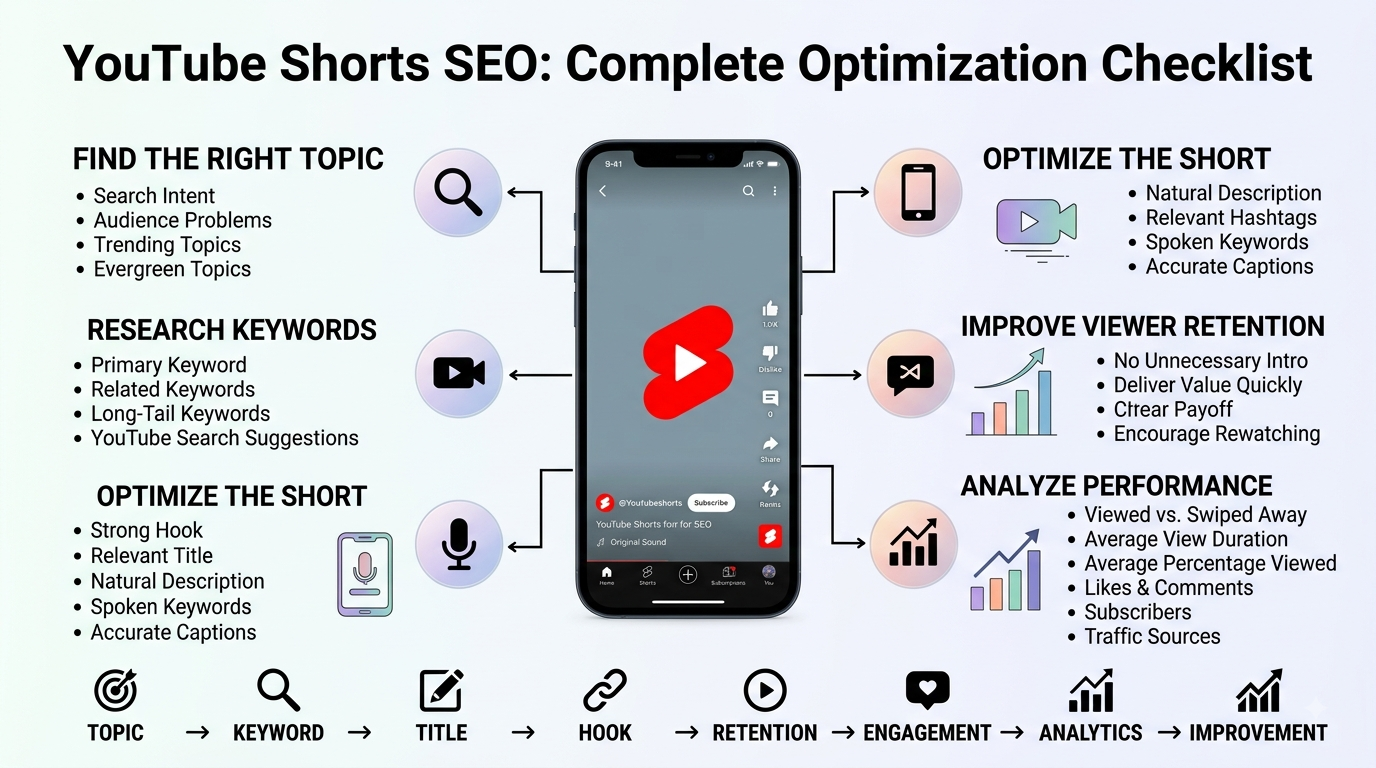
Important Shorts Metrics to Monitor
Pay particular attention to:
- Shown in feed: How often your Short was shown in the Shorts Feed.
- Viewed vs. swiped away / stayed to watch: Helps you understand how often viewers choose to watch rather than immediately move on.
- Average view duration: Shows how much time viewers who stayed are spending with the Short.
- Average percentage viewed: Helps put viewing time into context based on the video’s length.
- Likes and comments: Useful engagement indicators, although they should not be treated as a magic ranking score.
- Subscribers: Helps reveal which Shorts are contributing to channel growth.
- Traffic sources: Shows whether viewers are arriving from Search, Shorts Feed, channel pages, browse features, external sources, or other surfaces.
Don’t judge your entire channel based on one Short. Look for patterns across multiple uploads.
Why Some Shorts Get Views While Others Do Not?
This is one of the most frustrating questions creators ask: “Why are my YouTube Shorts not getting views?”
Sometimes the problem is discoverability. Sometimes it’s the topic. Sometimes the opening isn’t compelling. Sometimes the video simply isn’t satisfying the audience that receives it.
YouTube’s own guidance emphasizes that recommendation systems evaluate how viewers respond when content is recommended, including whether they choose to watch and whether they continue watching.
That means you shouldn’t automatically respond to low views by adding more hashtags.
Instead, diagnose the problem.
If viewers are swiping immediately, investigate the hook and opening visual.
If viewers stay briefly but leave quickly, investigate pacing and whether the video delivers what the title promised.
If retention is strong but the topic has limited demand, consider testing a more searchable version of the same subject.
If Search is bringing viewers but the Short isn’t converting them into subscribers, think about whether the video naturally leads into the rest of your channel.
Common YouTube Shorts SEO Mistakes to Avoid
Keyword Stuffing
Repeating the exact keyword in the title, description, captions, spoken audio, and hashtags can make content sound unnatural.
Use the primary phrase where it belongs, then write normally.
Writing Misleading Titles
A title that promises one thing while the video delivers another might attract an initial click or view, but it creates a poor viewer experience.
Search optimization should improve relevance, not manipulate it.
Obsessing Over Tags
YouTube says tags play a minimal role in discovery except in situations such as common misspellings.
Don’t spend your entire optimization process on them.
Ignoring the First Few Seconds
A perfect description doesn’t matter much if viewers immediately swipe away.
Make the opening understandable, visually interesting, and relevant.
Copying Viral Shorts Blindly
A viral video worked in a particular audience and context. Copying its structure without understanding why viewers liked it may produce a weak result.
Study successful videos for ideas about topic selection, hooks, pacing, storytelling, and presentation, then create something original.
Posting Without Reviewing Analytics
Consistency matters, but blind consistency isn’t a strategy.
Publish, measure, learn, adjust, and repeat.
How Does Consistency Affect a Shorts Strategy?
You do not need to upload five Shorts every day to prove that you are serious.
A sustainable publishing schedule is usually more useful than an aggressive schedule that destroys quality.
If you can comfortably publish three strong Shorts each week, that gives you enough opportunities to test topics, hooks, titles, formats, and audiences.
Over time, you build a dataset.
Maybe tutorials perform better on Mondays. Maybe short listicles generate more subscribers. Maybe storytelling produces better retention. Maybe your audience consistently searches for specific questions.
You won’t know until you publish enough content to identify patterns.
Think of your Shorts strategy like a laboratory. Every upload is an experiment.
How Shorts Can Support Overall YouTube Channel Growth?
Shorts don’t have to exist separately from your long-form strategy.
A Short can introduce a problem that a longer video solves in detail.
For example:
Short:
“3 Mistakes First-Time Homebuyers Make”
Long-form video:
“Complete First-Time Homebuyer Guide”
The Short can reach new viewers while the longer video provides deeper information.
This works particularly well when the content is closely connected. Don’t create random Shorts just because they’re popular if they attract viewers who have no interest in your main channel.
A channel grows more coherently when its Shorts and long-form content attract overlapping audiences.
A Practical YouTube Shorts SEO Checklist
Before publishing your next Short, run through this list:
- Is the topic clear?
- Does the video solve a real problem, answer a question, entertain, or teach something?
- Did you identify a primary search phrase or topic?
- Does the title accurately describe the video?
- Are the important words near the beginning of the title?
- Does the description naturally explain the video?
- Are hashtags relevant rather than excessive?
- Did you avoid relying on tags as your main SEO strategy?
- Does the spoken content clearly match the topic?
- Does the opening give viewers a reason to keep watching?
- Is unnecessary filler removed?
- Are captions accurate and readable?
- Does the ending deliver the promised value?
- Can viewers understand the Short without unnecessary context?
- Will you review the Short’s analytics after publishing?
- Are you using what you learn from previous Shorts to improve the next one?
Conclusion
Learning how to optimize YouTube Shorts for SEO is not about discovering a secret list of keywords that automatically produces viral views. The stronger approach is to make your topic clear, understand what your audience is searching for, create an accurate title and description, use relevant hashtags without overdoing them, and then focus heavily on the actual viewing experience.
The most important mindset shift is simple: SEO gets your content understood; good content gives people a reason to watch.
YouTube’s own documentation makes this distinction clear. Search considers relevance, engagement, and quality, while Shorts recommendations evaluate how viewers respond when Shorts are presented to them, including whether they choose to watch and how long they stay.
So don’t spend an hour trying to find the perfect tag while spending five minutes on the opening. Don’t stuff a keyword into every sentence. Don’t assume a viral format will automatically work for your audience.
Instead, choose a useful topic, understand the viewer’s intent, package it clearly, deliver the value quickly, and study the data afterward. Do that consistently and your YouTube Shorts SEO strategy becomes a process of continuous improvement rather than a guessing game.
Frequently Asked Questions (FAQs)
Do YouTube Shorts need SEO?
Yes, SEO can help YouTube understand what your Short is about and can support discoverability through YouTube Search. However, SEO alone does not guarantee views. Viewer response, relevance, satisfaction, and the quality of the content also matter.
How do I optimize a YouTube Short for SEO?
Start with a clear topic and search intent. Use a relevant primary phrase naturally in the title and description, make the spoken content match the topic, use appropriate hashtags, create a strong opening, and review your Shorts analytics after publishing.
Do hashtags help YouTube Shorts rank?
Hashtags help associate content with topics and make hashtag-based discovery possible, but they should not be treated as a shortcut to higher rankings. Use a small number of highly relevant hashtags instead of filling your description with unrelated ones.
Should I use keywords in my Shorts title?
Yes, when the keyword naturally describes what the Short is about. A clear, searchable title can help viewers and YouTube understand the subject. Avoid awkward keyword repetition.
Do YouTube tags matter for Shorts?
Tags have a limited role in discovery. YouTube says they are primarily useful for things such as commonly misspelled terms, while the title, thumbnail, and description are more important metadata elements.
How can I get more views on YouTube Shorts?
Focus on topics your audience actually cares about, create a strong opening, remove unnecessary filler, deliver the promised value, and study metrics such as shown in feed, viewed versus swiped away, average view duration, and average percentage viewed.
Why are my Shorts getting no views?
Low views can have many causes, including weak topic selection, poor viewer response, an ineffective opening, limited audience demand, or content that does not satisfy the viewers it reaches. Don’t assume hashtags or keywords are always the problem. Check your analytics and compare several Shorts rather than diagnosing your entire strategy from one upload.
How important is retention for YouTube Shorts?
Retention is an important performance signal because YouTube says its Shorts systems use average view duration and average percentage viewed, among other signals, when informing ranking. Strong retention is not a guarantee of distribution, but it can indicate that viewers are finding the content worth watching.
Can YouTube Shorts appear in YouTube Search?
Yes. Shorts can receive traffic from YouTube Search, and YouTube Analytics includes Search as one of the traffic sources creators can examine for Shorts.
How often should I post YouTube Shorts?
There is no universal posting frequency that guarantees growth. Choose a schedule you can maintain while keeping your content useful and consistent. A sustainable schedule also gives you enough uploads to test different topics and formats over time.
How long should a YouTube Short be?
There is no single ideal length. YouTube currently supports Shorts up to three minutes for eligible square or vertical uploads, but a Short should be only as long as necessary to deliver its idea effectively.
What makes a YouTube Short go viral?
There is no guaranteed viral formula. Strong viewer interest, an effective hook, high-quality execution, relevance to the intended audience, and positive viewer response can all contribute to wider distribution, but no combination guarantees a specific number of views.